
Logging
We have to differentiate between logging facades and logging providers (or implementations).
A logging facade is an abstraction layer that provides a uniform API for logging, while a logging provider (or implementation) is the actual engine that handles the storage and output of those logs.
Logging Facade io.github.oshai:kotlin-logging
For all libraries we use io.github.oshai:kotlin-logging as logging facade. This allows us to do logging from our common code in a multiplatform way.
The Library-User (The "Consumer") has the choice of Implementation. We don't force users to use a specific logger. If they prefer Logback, Log4j2,
logcat or even java.util.logging, our library will automatically pipe its logs into their chosen system.
Using a logging facade also prevents dependency conflicts and allows for better modularity.
How to use kotlin-logging:
package id.walt.somepackage

import io.github.oshai.kotlinlogging.KotlinLogging

// This logger uses the default name based on the class. This is the recommended approach for logging in Kotlin,
// as it allows for better organization and filtering of log messages based on class and package
private val logger = KotlinLogging.logger {}

// !! DON'T USE CUSTOM LOGGER NAMES !!
// The logger configuration is based on class and package names. Using custom names can
// lead to confusion and misconfiguration.
private val loggerDontUse = KotlinLogging.logger("Fancy Logger Name")

class SomeClass {

    fun someMethod() {
        try {
            logger.info { "This is an info log message." }
            logger.warn { "This is a warning log message." }
        } catch (e: Exception) {
            logger.error(e) { "An error occurred." }
        }
    }
}
!! DON'T USE CUSTOM LOGGER NAMES !!
The logger configuration is based on class and package names. Loggers are configured in a hierarchical way, where loggers inherit configuration from their parent loggers. Using custom names can lead to confusion and misconfiguration, as the logger will not be part of the expected hierarchy and might not receive the intended configuration.
!!
io.github.oshai:kotlin-loggingdoesn't support MDC (Mapped Diagnostic Context) !!
Log Provider / Implementation io.klogging:klogging
Klogging.io is a "pure-Kotlin" logging library designed to address the architectural gaps left by veteran Java frameworks like Logback and Log4j when used in modern, asynchronous Kotlin environments.
Features
- Native Coroutine Context HandlingKlogging’s standout feature is its ability to seamlessly carry scope context information through Kotlin Coroutines. Automatic Propagation: It uses logContext to store metadata (like a runId or correlationId) in the coroutine scope. Any logs emitted by suspend functions within that scope automatically include this data. Replaces Manual MDC: In traditional Java libraries, you must manually manage the Mapped Diagnostic Context (MDC) by adding and removing items from thread-local storage. Klogging eliminates this boilerplate and the risk of data "leaking" between threads.
- Structured Logging by Default Unlike older libraries that prioritize plain text strings, Klogging treats logs as structured parcels of data from the start. Message Templates: It uses a message template approach to capture both a human-readable message and its associated data values in a single call. Searchability: Because logs are structured (often output as JSON), they are immediately ready for high-performance ingestion and filtering in tools like the ELK Stack or New Relic, without needing complex regex parsing.
- Precision and Ordering One of the core motivations for Klogging was overcoming Logback's millisecond limitation. Nanosecond Resolution: Klogging captures the finest possible timestamp resolution (up to nanoseconds). Accurate Event Sequencing: In high-throughput or distributed systems, millisecond timestamps often result in multiple events appearing to happen at the exact same time. Nanosecond precision ensures that log aggregators can reconstruct the correct order of events.
- Efficient Asynchronous Processing Klogging is built to be non-blocking by offloading the heavy lifting of logging to its own coroutine channels. Background Dispatching: When a log is emitted, it is sent into an events channel immediately, allowing the main application thread to continue execution without waiting for the log to be rendered or sent to a remote sink. Lazy Evaluation: It uses lambda-based logging (e.g., logger.info { "expensive $data" }), where the message is only constructed if the log level is actually enabled.
- Multiplatform and Integration SLF4J Compatibility: It provides an SLF4J provider, allowing you to use Klogging as the backend for existing libraries and frameworks (like Spring Boot or Ktor) that rely on the SLF4J API. Future Multiplatform: While currently focused on the JVM, it is designed as a pure-Kotlin library with the goal of eventually supporting Kotlin Multiplatform (JS, Native, etc.).
We use Klogging as the main logging provider in all our applications which run in a JVM environment, because of its advanced features and high performance.
For Unit-Tests which run in the JVM we also use Klogging as the logging provider, because it allows us to easily configure the logging output for tests.
In order to be able to use all the features of Klogging, we use it in a direct way and bypass logging facades like SLF4J or kotlin-logging for our applications.
How we use klogging
The preferred way to use Klogging is to inherit from the io.klogging.Klogging interface, which provides a logger property that can be used to log messages.
By inheriting from the interface, we ensure that the logger is initialized in a recommended way.
Class with suspend functions
package id.walt.somepackage

import io.klogging.Klogging

class SomeClass : Klogging {

    suspend fun someMethod() {
        try {
            logger.info { "This is an info log message." }
            logger.warn { "This is a warning log message." }
        } catch (e: Exception) {
            logger.error(e) { "An error occurred." }
        }
    }
}
Class with suspend functions and companion object (static methods)
package id.walt.somepackage

import io.klogging.Klogging

class SomeClass {

    companion object : Klogging {
        suspend fun someCompanionMethod() {
            logger.info { "This is an info log message from companion object." }
            logger.warn { "This is a warning log message from companion object." }
        }
    }

    suspend fun someMethod() {
        try {
            someCompanionMethod()
        } catch (e: Exception) {
            logger.error(e) { "An error occurred." }
        }
    }
}
Class without suspend functions and with companion object (static methods)
If methods are not suspendfun then the preferred way to use Klogging is to
inherit from the io.klogging.NoCoLogging interface.
package id.walt.somepackage

import io.klogging.NoCoLogging

class SomeClass {

    companion object : NoCoLogging {
        fun someCompanionMethod() {
            logger.info { "This is an info log message from companion object." }
            logger.warn { "This is a warning log message from companion object." }
        }
    }

    fun someMethod() {
        try {
            someCompanionMethod()
        } catch (e: Exception) {
            logger.error(e) { "An error occurred." }
        }
    }
}
With the use of inheriting from the Klogging or NoCoLogging interface,
the logger is automatically initialized with the correct name based on the class and package name,
which allows for better organization and filtering of log messages based on class and package.
If the logger is needed outside a class (e.g. in a top-level function), then the logger can be defined as follows:
For suspend functions:
package id.walt.somepackage

import io.klogging.logger

private val logger = logger("id.walt.somepackage.FileName")

suspend fun xyz() {
    logger.info { "Some log message" }
}
For non-suspend functions:
package id.walt.somepackage

import io.klogging.noCoLogger

private val noCoLogger = noCoLogger("id.walt.somepackage.FileName")

fun abc() {
    noCoLogger.info { "Some log message" }
}
How to use MDC (Mapped Diagnostic Context) with Klogging
The Mapped Diagnostic Context (MDC) is a feature that allows you to attach contextual information in a structured way to log messages. This information can be very useful for debugging and tracing. It enables you to filter and search logs based on specific criteria, such as request ID, session ID, or any other relevant data.
The MDC is not added to log-messages from NoCoLoggers
In non-suspend functions structured data can be added to the log-message in the way:
package id.walt.somepackage

import io.klogging.NoCoLogging

class LoggingTest : NoCoLogging {
    fun someMethod() {
        logger.info("This is an info log message.", items = mapOf("key" to "value"))
    }
}
The full support of MDC is only available in suspend functions with the use of KLogging, where you can use the withLogContext
and addToContext to add contextual information that will be automatically
included in all log messages emitted within the same coroutine scope:
package id.walt.somepackage

import io.klogging.Klogging
import io.klogging.context.addToContext
import io.klogging.context.withLogContext

class SomeClass {

    companion object : Klogging {
        suspend fun someCompanionMethod() {
            addToContext("someId" to "12345") // add someId to the log context,
            // which will be included in all log messages emitted within
            // the same coroutine scope
            logger.info { "This is an info log message from companion object." }
        }
    }

    suspend fun someMethod() {
        withLogContext("someName" to "abc") {
            logger.info { "Method someMethod is called." }
            someCompanionMethod()
            logger.info("the id: '{xId}'.", "xx-id")
        }
    }
}
The log output looks like:
2026-03-05 13:35:06.969794714 INFO [@kotlinx.coroutines] id.walt.somepackage.SomeClass : Method someMethod : {someName=abc}
2026-03-05 13:35:06.970513869 INFO [@kotlinx.coroutines] id.walt.somepackage.SomeClass : This is an info log message from companion object. : {someName=abc, someId=12345}
2026-03-05 13:35:06.971174474 INFO [@kotlinx.coroutines] id.walt.somepackage.SomeClass : the id: 'xx-id'. : {someName=abc, someId=12345, xId=xx-id}
Unfortunately the MDC support is only available in suspend functions, as it relies on the coroutine context to propagate the contextual information.
In non-suspend functions, you can still add structured data to the log message using the items parameter of the logging methods,
but this data will not be automatically propagated to other log messages and will not be available in the same way as
MDC data in suspend functions.
Also see here for more details on how to use the NoCoLogger MDC.
MDC variables
TODO: fill table
| Name | Description | Dev Note |
|---|---|---|
| userId | Holds userId provided by external authenticate provider | TODO: needs to be implemented, at the moment userId is set to accountId |
| accountId | Holds id of the user account stored in the DB | |
| method | HTTP method of request | |
| target | Resource reference targeted with HTTP request | |
| operation | REST API operation name | |
| organizationId | organizationId of the resource reference targeted with HTTP request | |
| tenantId | tenant resource reference of the resource targeted with HTTP request | Needs to be implemented |
| issuerId | ||
| authState | ||
| sessionId | ||
| credentialConfigurationId | ||
| authenticationMethod | ||
| issuanceSessionId | ||
| authServerState | ||
| standardVersion | ||
| docType | ||
| verificationSessionId | ||
| verifierId | ||
| tenantId | ||
| walletId |
Logging messages
Always use lazy log message evaluation:
// BAD:
logger.debug("Message ${x}") // avoid - the string will be evaluated even if the debug log level is not enabled

// GOOD:
logger.info(
    "User '{userId}' signed in",
    userId
) //The message template will only be evaluated if the info log level is enabled, and the userId will be included as structured data in the log event (MDC)
// the key for the MDC item will be "userId" (string between curly brackets) and the value will be the value of the userId variable. This allows for better searchability and filtering of logs based on the userId in log aggregators like ELK or New Relic.

// GOOD:
logger.debug { "Message: '${x}'" } // Use a lambda to lazily evaluate the string only if the debug log level is enabled, Kotlin String Templates might be more powerful than Klogging template rendering
// in this case, no item will be added to MDC
This will cause the string to only be evaluated if the log level is enabled in the first place. In the example above, if the debug log level is not enabled, the message will not be evaluated (which, depending on what you are evaluating, could be a potentially expensive operation).
It is always a good practice to quote the variables in the log message (e.g.
"User '{userId}' signed in"), as this allows for better readability of the logs and also allows to detect unexpected whitespace in the values. In the example, if the userId variable contains a value with leading or trailing whitespace, it will be visible in the logs as the value will be enclosed in single quotes.
Loglevel
| Severity | Audience | Description |
|---|---|---|
| ERROR | Service Administrator, Developer | Sth. went wrong - processing of the task (eg. startup, request, ...) needs to be aborted |
| WARN | Service Administrator, Developer | The service is still working, but the Service Administrator needs to be aware of some condition (e. g. request on external service took very long, application is started in Dev Mode, deprecated feature is used) |
| INFO | Service Administrator, Developer | Information the Service Administrator should be aware of (e. g. Service listening on port 3000, ...), or useful information for the traceability of certain usecases (issuance session with id started, credential claimed by user, ...) |
| DEBUG | Developer | Enabled on demand to track down some bug |
| TRACE | Developer | Enabled on demand to track down some bug |
Logging libraries in detail
SLF4J (logging facade)
SLF4J: Used by almost all Java libraries.
From Wikipedia:
Simple Logging Facade for Java (SLF4J) provides a Java logging API by means of a simple facade pattern. The underlying logging backend is determined at runtime by adding the desired binding to the classpath and may be the standard Sun Java logging package java.util.logging,2 Log4j, Reload4j, Logback3 or tinylog.
Basically, SLF4J is just a standardized interface over many different logging backends, and does not
do anything of its own. Note: slf4j-simple is one possible backend, not a or the standard one. It's
mainly used for basic / testing use cases.
The "underlying logging backend" we utilize is Klogging (io.klogging:klogging) vis slf4j-klogging (io.klogging: slf4j-klogging).
kotlin-logging (logging facade)
kotlin-logging: Kotlin multiplatform library that allows to do logging from common code, while targeting the preferred logging interface for the respective platforms (e.g. SLF4J on Java, native android Log, darwin os log, etc.).
This is currently used in the multiplatform libraries, as it allows for simple multiplatform access to platform native logging interfaces (as we cannot depend on SLF4J on iOS or similar, of course).
Bridges to SLF4J (on Java)
JUL & jul-to-slf4j (Java Util Logging bridge to SLF4J)
java.util.logging
Used by very few Java libraries, but still needs to be handled. We use jul-to-slf4j to bridge java.util.logging to SLF4J, so that logging by Java libraries that use JUL is being handled as if they were using SLF4J from the get-go.
Bridges to SLF4J
Klogging & slf4j-klogging
Klogging: Multiplatform Kotlin logging framework used in our backends / services.
Features
- Very powerful: Supports features like structured logs, execution scope information, and supports native
microsecond/nanosecond precision timestamps
- Beneficial in our case for backend / service logging
- High-performance (concurrent): Coroutine based, allows batching logs to different backends
- Beneficial in our case for backend / service logging
- Configuration: Supports runtime (in-code) configuration (unlike slf4j-simple), but can also be configured via JSON /
HOCON configuration
- This was initially one of the main points why we moved towards this system: Allow customers to customize the logging when running on their system
- Very flexible: Allows rendering logs in different formats, supports different APIs where logs can be sent to
- Highly beneficial in our case where customers run services within their own infrastructure, which might very well use a different log system compared to us
Rendering
Can render logs in various forms:
- Simple: Simple text format
- ANSI: Text format for consoles, with ANSI colouring of log levels, similar like Log4J2
- ISO8601: Basic text format with ISO timestamps
- CLEF: Compact Log Event Format (JSON-based format), as can be used for Seq
- ECS: Elastic Common Schema (JSON), to send data directly to ELK stack.
- ECSDotNet: JSON that mimics Elastic Common Schema for .NET
- GELF: JSON format for Graylog
- HEC: JSON event format for Splunk HTTP Event Collector
- etc...
Sending
Allows sending logs to various log collection systems:
- Console:
- Standard output stream
- Standard error stream
- Writes logs to console, as common for most Java frameworks (allows standard collection of logs on Kubernetes: the default Kubernetes logging framework recommends capturing the standard output (stdout) and standard error output ( stderr) from each container on the node)
- Logstash: Send logs to Logstash in the ECS format, as part of ELK stack
- Graylog: Send logs to Graylof in GELF format
- Seq: Sends logs to Seq in CLEF format
- Splunk: Sends logs to Splunk in HEC format
Keep in mind that different logging system might support the same format/API and can thus also be utilized.
Usage
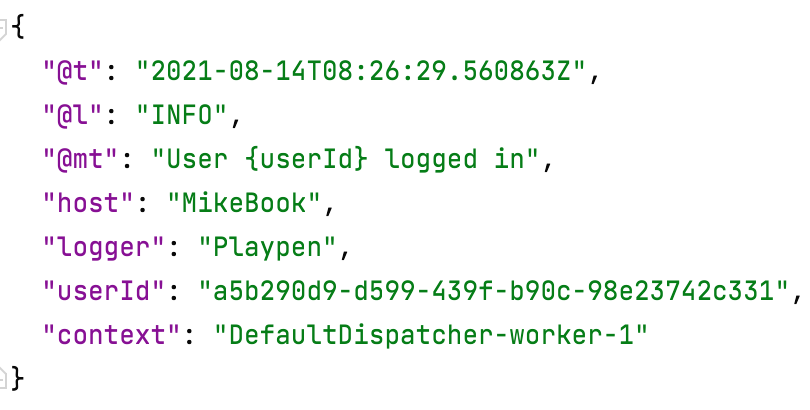
Create structured logs
Use message template in logging code:

Klogging creates a structured log event:
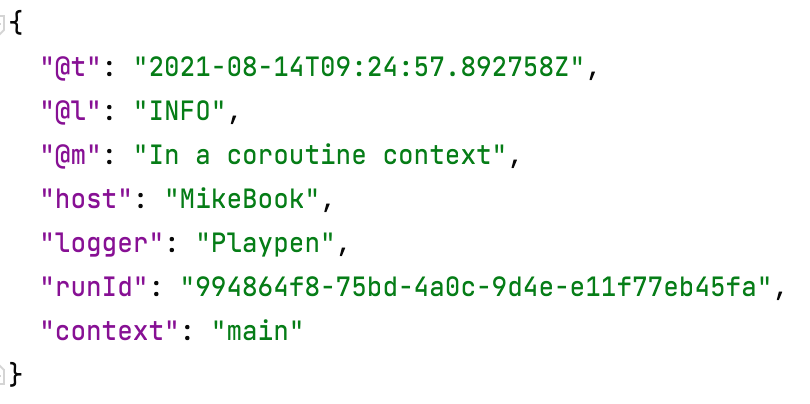
Log information about execution scope
Put some information into coroutine scope:

Klogging includes the information in the log event:
Timestamp resolution
Klogging uses the finest resolution available: at least microsecond, and down to nanosecond if available.
This avoids this situation:

Asynchronous handling of log events

Configuration
See here for an HOCON example. See here for a reference of config options.
Example file:
{
  sinks = {
    stdout = {
      renderWith = RENDER_SIMPLE
      sendTo = STDOUT
    },
    seq = {
      seqServer = "http://localhost:5341"
    }
  },
  logging = [
    {
      fromLoggerBase = com.example
      levelRanges = [
        {
          fromMinLevel = INFO
          toSinks = [stdout]
        }
      ]
    }
  ]
}
To load this file, you can either set the environment variable KLOGGING_CONFIG_PATH, or alternatively put the file
into the classpath as klogging.conf.